Ask yourself: Do I know where my site stands with dangerous goods today?
What are the thresholds for my sites? Are you approaching the quantities planning or licence limits allow? Are the site storage combinations creating risks? Are your Safety Data Sheets current?
These are the questions site managers and safety teams need to answer. The information may be available, but connecting it into a clear picture takes time.
DGXprt 2026.11 brings that picture together.
The new Compliance Overview gives each site a single view of its key compliance information, potential gaps and next steps. From there, teams can move straight to the detail behind a result.
Alongside it, Site Limits helps you monitor planning and licence limits, set internal operating limits and manage stock before reaching regulatory thresholds that bring additional obligations. An updated Segregation Guide makes the combinations needing review easier to find.
Together, they help teams see where they stand, focus their attention and act.
NEW in 2026.11
Compliance Overview
See the position. Find the gaps. Get to the detail.
A threshold calculation tells one part of a site’s story. Inventory, Safety Data Sheets, segregation, manifests and Major Hazard Facility assessments tell others.
Compliance Overview brings those parts into one view, making the information across DGXprt easier to understand and use.
It helps site managers and safety teams answer the questions that drive action:
- What do I need to do? See the storage threshold level your site has reached, how close it is to the next level and the obligations that apply.

- What am I storing? Understand the mix of dangerous goods on site and which products account for the largest volumes.
- Which SDSs need reviewing and replacing? View expired or poor-quality Safety Data Sheets for review or replacement.
- When did I last update site inventory? See when it was last updated and check whether it still reflects what is on site.
- Which storage combinations need review? Identify potential segregation risks, starting with the highest risks, and recommend measures.
- Is my manifest ready when it matters? Check whether a required manifest is in place and needs updating, so regulators don’t issue a notice and emergency responders have accurate site information.
- Where does my latest MHF assessment put the site? See the aggregate quantity ratio (AQR) from your latest assessment and what’s driving the result.
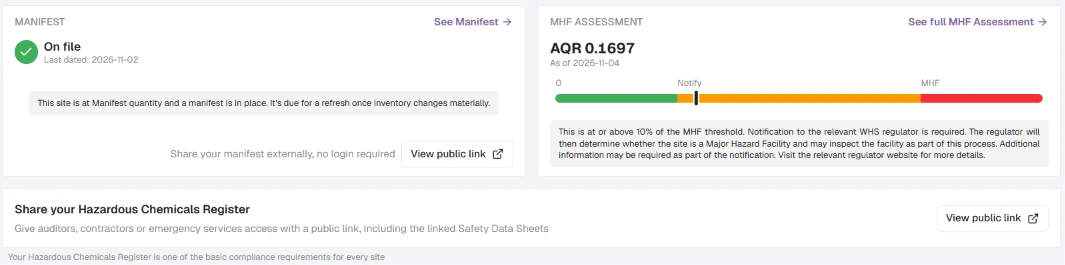
- Am I approaching a site limit? Compare stored quantities with your recorded limits to plan stock decisions before you exceed a limit.
- Where can I get more guidance? Open SDS Q&A for product questions or the AI Assistant for guidance on the obligations that apply to your site.
Each summary opens the relevant details, helping the person responsible move from a question to the information needed to address it.
The view draws on DGXprt’s existing calculations and follows each user’s access permissions. Managers get a clearer starting point, with the supporting detail close at hand.
Site Limits
More control over what you hold. Greater confidence in safe storage.
Knowing which regulatory thresholds apply is essential. Your site may also have approved storage limits based on a site-specific risk assessment and the controls needed to keep people safe. Staying within those limits helps ensure the quantities you hold remain within what the site is equipped and approved to handle.
Site Limits helps you monitor those quantities and set internal limits, so you can act early and keep safety at the centre of stock decisions.
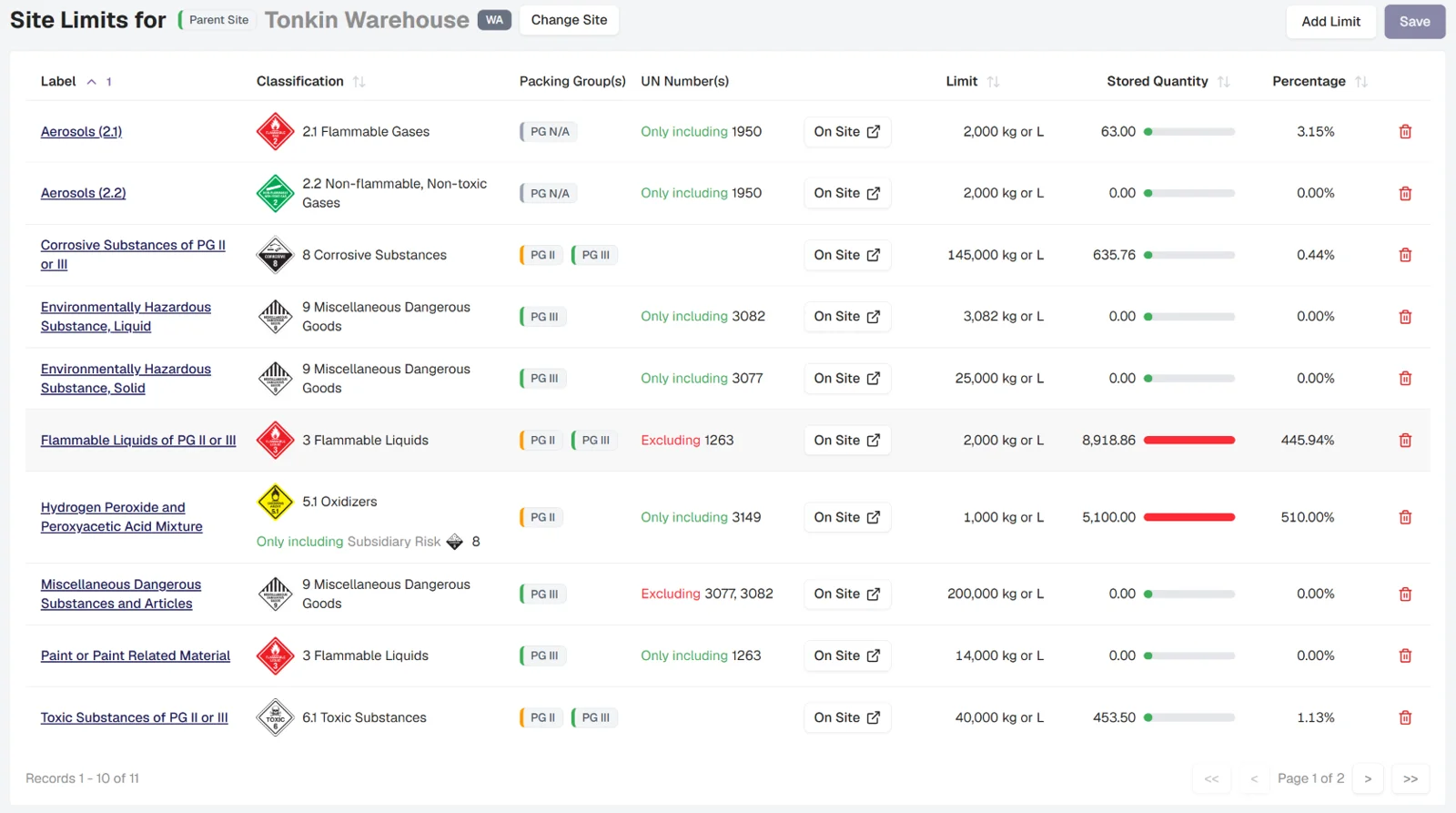
Site Limits helps you go further: monitor the quantities allowed by your planning approval or dangerous goods licence, and set internal operating limits to give your team room to act before a regulatory threshold brings more demanding obligations.
You might record the maximum quantity your approval permits, or choose a lower internal limit to help keep stock below a regulatory threshold. DGXprt compares the limits you enter with quantities held in Site Inventory, showing how much of each limit is being used.
That gives teams a practical basis for reviewing incoming deliveries, adjusting stock levels and planning changes before a limit is exceeded.
Know how close you are to your limits, so you can act early.
Progress bars and percentages make each limit easy to track. Products outside the limits entered are listed separately for review.
Limits can be set by dangerous goods class, including C1 combustible liquids, and refined by subsidiary risk, packing group or UN number. For example, a site can record separate limits for Class 2.1 aerosols and other Class 2.1 products.
The same information appears on Compliance Overview, putting your operating limits alongside your regulatory threshold position.
It means greater control over day-to-day stock decisions, and greater peace of mind from knowing where quantities stand against the limits you have set. Teams remain responsible for keeping those limits aligned with current approvals, licences and operating requirements.
Site Limits availability depends on subscription.
Segregation Guide
Bring potential storage clashes into focus
Which dangerous goods combinations should your team look at first?
The new Summary by Category view makes that review easier. Each pairing of dangerous goods classes appears once, with an incompatible, caution or compatible rating.
Users can open a pairing to explore the risks, recommended segregation measures and products involved. Risk sorting helps surface potential issues, while the existing matrix remains available.
It gives site managers and safety teams a clearer way to review storage combinations and discuss what needs attention on the ground.
The bigger picture
More connected information. Clearer site decisions.
Every product added, quantity updated and Safety Data Sheet processed contributes to a wider understanding of the site.
DGXprt connects that information across storage thresholds, registers, segregation, manifests and risk assessments. With 2026.11, teams gain a single view of where they stand and more control over where they are heading.
Compliance Overview helps them identify what needs attention today. Site Limits helps them plan stock decisions before limits and thresholds are reached.
That extends DGXprt’s value across the organisation: from the people maintaining product records to the managers accountable for what happens on site.
A clearer position today. More control over tomorrow.
Continue reading
DGXprt 2026.9: Risk assessments done well, by the people closest to the work
DGXprt 2026.9 introduces Product Risk Assessments and moves storage threshold calculations to assess directly against GHS classifications.
Read moreExplore DGXprtDangerous goods compliance software built for Australian requirements
See how DGXprt turns live site inventory and SDS data into clear, traceable compliance guidance.
Read moreSee your site’s position come together.
Explore how DGXprt brings site information, storage limits and potential segregation risks into one connected picture.
Book a personalised demo and see how your team can take greater control.
Contact info@dgxprt.com.